> ## Documentation Index
> Fetch the complete documentation index at: https://docs.sequence.xyz/llms.txt
> Use this file to discover all available pages before exploring further.
# クレジットカードによるオンランプ
> Sequenceインフラストラクチャスタックを用いたweb3ゲーム向けUnreal SDK概要のドキュメントです。
ゲーム内でユーザーが暗号資産で支払いできるようにしたい場合、Transakとの連携が非常に便利です。
Transakは、ユーザーが使いやすいウェブインターフェースを通じて、クレジットカードで様々なブロックチェーン上の暗号資産を購入できるサービスです。Transakの詳細は[こちら](https://transak.com/)をご覧ください。
## オンランプURLの生成
ユーザーのTransakオンランプ用リンクを生成します。
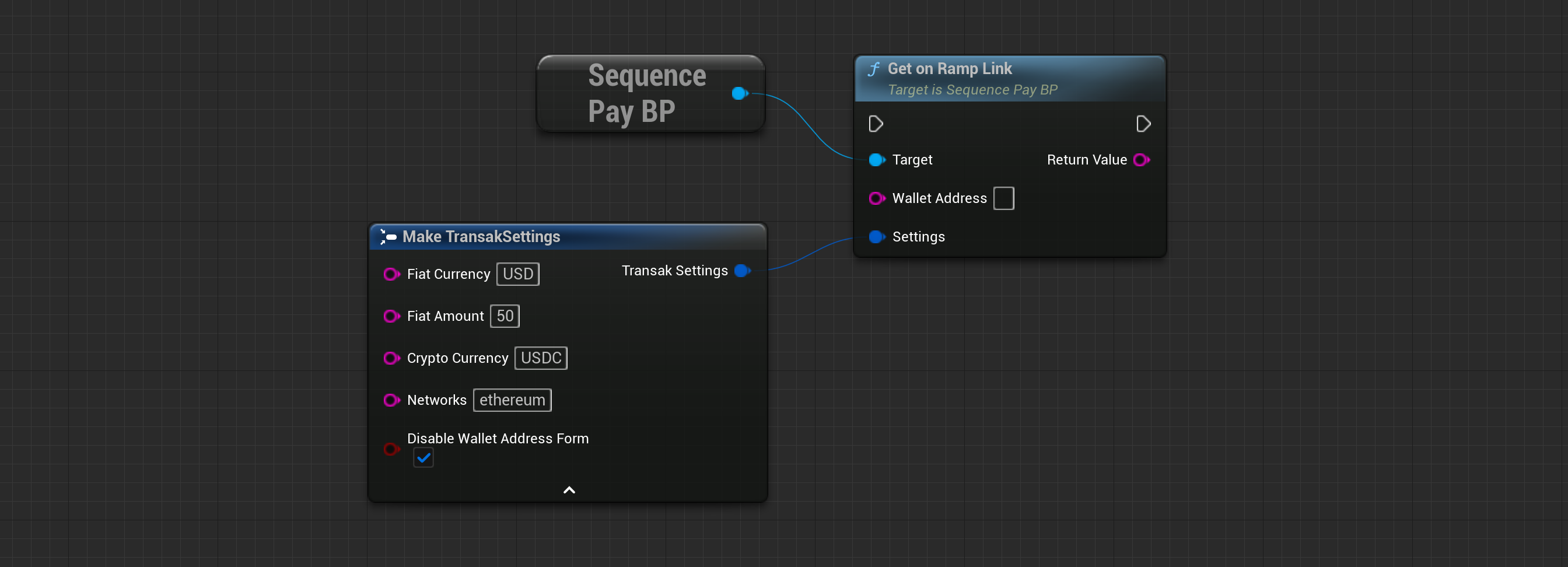 ```cpp theme={null}
UTransakOnRamp* Transak = UTransakOnRamp::Init("UserWalletAddress");
FString OnRampLink = Transak->GetTransakLink("USD", "100", "BTC", "network1,network2", false);
// You can tailor the user experience by providing different default values for the parameters.
```
**ウォレットアドレス(FString)**
購入した暗号資産を受け取るユーザーのアドレス。
**法定通貨(FString)**
オンランプモーダルで表示されるデフォルトの法定通貨。
**法定通貨額(FString)**
オンランプモーダルで表示されるデフォルトの法定通貨額。
**暗号通貨(FString)**
ユーザーが購入できる暗号通貨。
**ネットワーク(FString)**
ユーザーが選択できるネットワークのリスト。カンマ区切りで指定します。例:'ethereum, mainnet'。
**ウォレットアドレスフォームの無効化(ブール値)**
ユーザーがウォレットアドレスを編集できるようにするには、この値を'false'に設定してください。
**返却型(FString)**
WebViewや外部Webブラウザで開くためのオンランプリンク。
## オンランプURLを開く
ユーザーのTransakオンランプ用リンクを生成するには:
```cpp theme={null}
UTransakOnRamp* Transak = UTransakOnRamp::Init("UserWalletAddress");
FString OnRampLink = Transak->GetTransakLink("USD", "100", "BTC", "network1,network2", false);
// You can tailor the user experience by providing different default values for the parameters.
```
**ウォレットアドレス(FString)**
購入した暗号資産を受け取るユーザーのアドレス。
**法定通貨(FString)**
オンランプモーダルで表示されるデフォルトの法定通貨。
**法定通貨額(FString)**
オンランプモーダルで表示されるデフォルトの法定通貨額。
**暗号通貨(FString)**
ユーザーが購入できる暗号通貨。
**ネットワーク(FString)**
ユーザーが選択できるネットワークのリスト。カンマ区切りで指定します。例:'ethereum, mainnet'。
**ウォレットアドレスフォームの無効化(ブール値)**
ユーザーがウォレットアドレスを編集できるようにするには、この値を'false'に設定してください。
**返却型(FString)**
WebViewや外部Webブラウザで開くためのオンランプリンク。
## オンランプURLを開く
ユーザーのTransakオンランプ用リンクを生成するには:
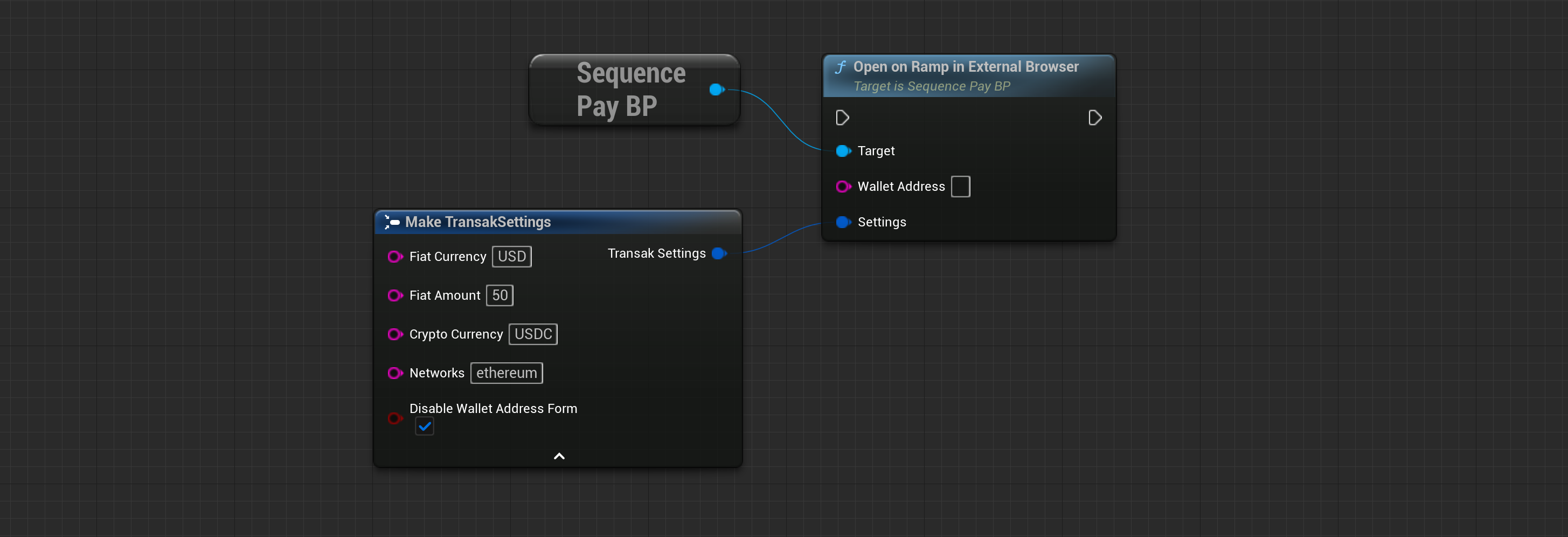 ```cpp theme={null}
UTransakOnRamp* Transak = UTransakOnRamp::Init("UserWalletAddress");
Transak->OpenTransakLink("USD", "100", "BTC", "network1,network2", false);
// This will automatically open the generated Transak On-Ramp link in the default web browser.
```
**ウォレットアドレス(FString)**
購入した暗号資産を受け取るユーザーのアドレス。
**法定通貨(FString)**
オンランプモーダルで表示されるデフォルトの法定通貨。
**法定通貨額(FString)**
オンランプモーダルで表示されるデフォルトの法定通貨額。
**暗号通貨(FString)**
ユーザーが購入できる暗号通貨。
**ネットワーク(FString)**
ユーザーが選択できるネットワークのリスト。カンマ区切りで指定します。例:'ethereum, mainnet'。
**ウォレットアドレスフォームの無効化(ブール値)**
ユーザーがウォレットアドレスを編集できるようにするには、この値を'false'に設定してください。
## 対応国の取得
Transakが対応している国やサポート内容を確認するには、`GetSupportedCountries` メソッドを使用してください。
```cpp theme={null}
UTransakOnRamp* Transak = UTransakOnRamp::Init("UserWalletAddress");
Transak->OpenTransakLink("USD", "100", "BTC", "network1,network2", false);
// This will automatically open the generated Transak On-Ramp link in the default web browser.
```
**ウォレットアドレス(FString)**
購入した暗号資産を受け取るユーザーのアドレス。
**法定通貨(FString)**
オンランプモーダルで表示されるデフォルトの法定通貨。
**法定通貨額(FString)**
オンランプモーダルで表示されるデフォルトの法定通貨額。
**暗号通貨(FString)**
ユーザーが購入できる暗号通貨。
**ネットワーク(FString)**
ユーザーが選択できるネットワークのリスト。カンマ区切りで指定します。例:'ethereum, mainnet'。
**ウォレットアドレスフォームの無効化(ブール値)**
ユーザーがウォレットアドレスを編集できるようにするには、この値を'false'に設定してください。
## 対応国の取得
Transakが対応している国やサポート内容を確認するには、`GetSupportedCountries` メソッドを使用してください。
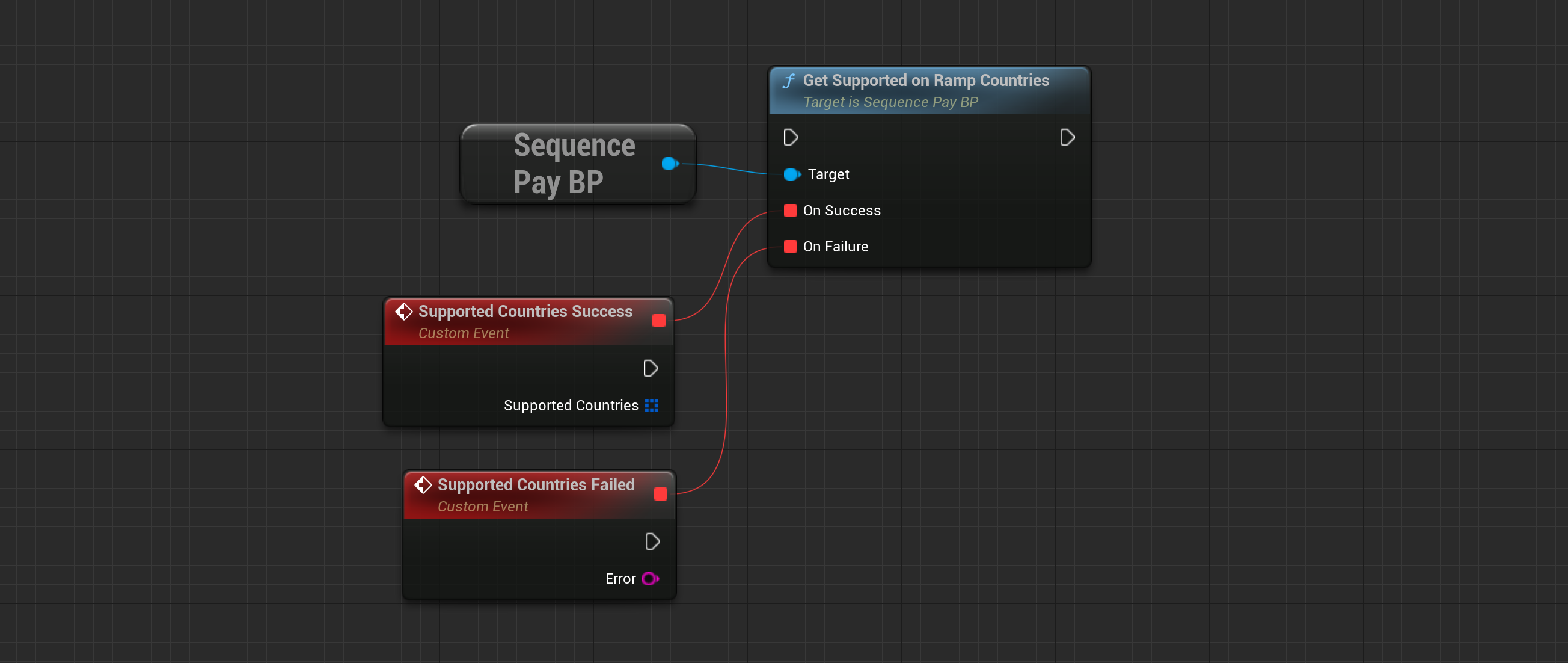 ```cpp theme={null}
Transak->GetSupportedCountries(
[](TArray SupportedCountries) {
for (const FSupportedCountry& Country : SupportedCountries) {
UE_LOG(LogTemp, Log, TEXT("Country: %s"), *Country.CountryName);
}
},
[](FSequenceError Error) {
UE_LOG(LogTemp, Error, TEXT("Encountered error fetching supported countries from Transak: %s"), *Error.ErrorMessage);
}
);
```
**対応国(FSupportedCountryの配列)**
各国の名称や通貨コードなどの情報を含むオブジェクトのリスト。
```cpp theme={null}
Transak->GetSupportedCountries(
[](TArray SupportedCountries) {
for (const FSupportedCountry& Country : SupportedCountries) {
UE_LOG(LogTemp, Log, TEXT("Country: %s"), *Country.CountryName);
}
},
[](FSequenceError Error) {
UE_LOG(LogTemp, Error, TEXT("Encountered error fetching supported countries from Transak: %s"), *Error.ErrorMessage);
}
);
```
**対応国(FSupportedCountryの配列)**
各国の名称や通貨コードなどの情報を含むオブジェクトのリスト。