> ## Documentation Index
> Fetch the complete documentation index at: https://docs.sequence.xyz/llms.txt
> Use this file to discover all available pages before exploring further.
# Onboard User Funds
> Documentation for Unreal SDK overview for the Sequence infrastructure stack for web3 gaming.
If you wish for your users to be able to pay for things in your game using cryptocurrencies, you'll find our Transak integration to be very helpful.
Transak allows users to purchase a variety of cryptocurrencies on a variety of blockchains using their credit card using a user friendly web interface. Learn more about Transak [here](https://transak.com/).
## Generate On-Ramp URL
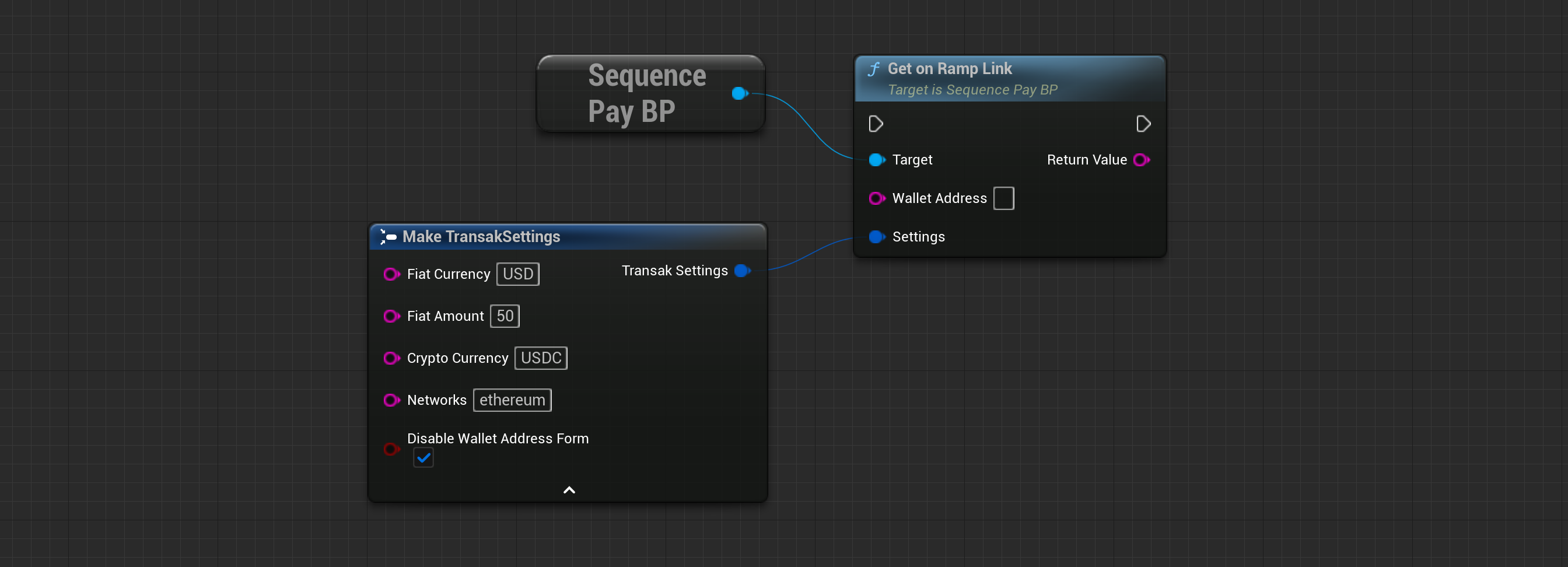
To generate a link for your user's Transak on-ramping.
 ```cpp theme={null}
UTransakOnRamp* Transak = UTransakOnRamp::Init("UserWalletAddress");
FString OnRampLink = Transak->GetTransakLink("USD", "100", "BTC", "network1,network2", false);
// You can tailor the user experience by providing different default values for the parameters.
```
**Wallet Address (FString)**
The address of the user who receives the purchased amount of cryptocurrency.
**Fiat Currency (FString)**
The default fiat currency displayed in the On-Ramp modal.
**Fiat Amount (FString)**
The default fiat amount displayed in the On-Ramp modal.
**Crypto Currency (FString)**
The cryptocurrency the user is allowed to purchase.
**Networks (FString)**
List of networks the user can select, separated by a comma. For example: 'ethereum, mainnet'.
**Disable Wallet Address Form (Boolean)**
Set this value to 'false' to allow users to edit their wallet address.
**Return Type (FString)**
The On-Ramp link used to open in a WebView or external Web Browser.
## Open On-Ramp URL
To generate a link for your user's Transak on-ramping:
```cpp theme={null}
UTransakOnRamp* Transak = UTransakOnRamp::Init("UserWalletAddress");
FString OnRampLink = Transak->GetTransakLink("USD", "100", "BTC", "network1,network2", false);
// You can tailor the user experience by providing different default values for the parameters.
```
**Wallet Address (FString)**
The address of the user who receives the purchased amount of cryptocurrency.
**Fiat Currency (FString)**
The default fiat currency displayed in the On-Ramp modal.
**Fiat Amount (FString)**
The default fiat amount displayed in the On-Ramp modal.
**Crypto Currency (FString)**
The cryptocurrency the user is allowed to purchase.
**Networks (FString)**
List of networks the user can select, separated by a comma. For example: 'ethereum, mainnet'.
**Disable Wallet Address Form (Boolean)**
Set this value to 'false' to allow users to edit their wallet address.
**Return Type (FString)**
The On-Ramp link used to open in a WebView or external Web Browser.
## Open On-Ramp URL
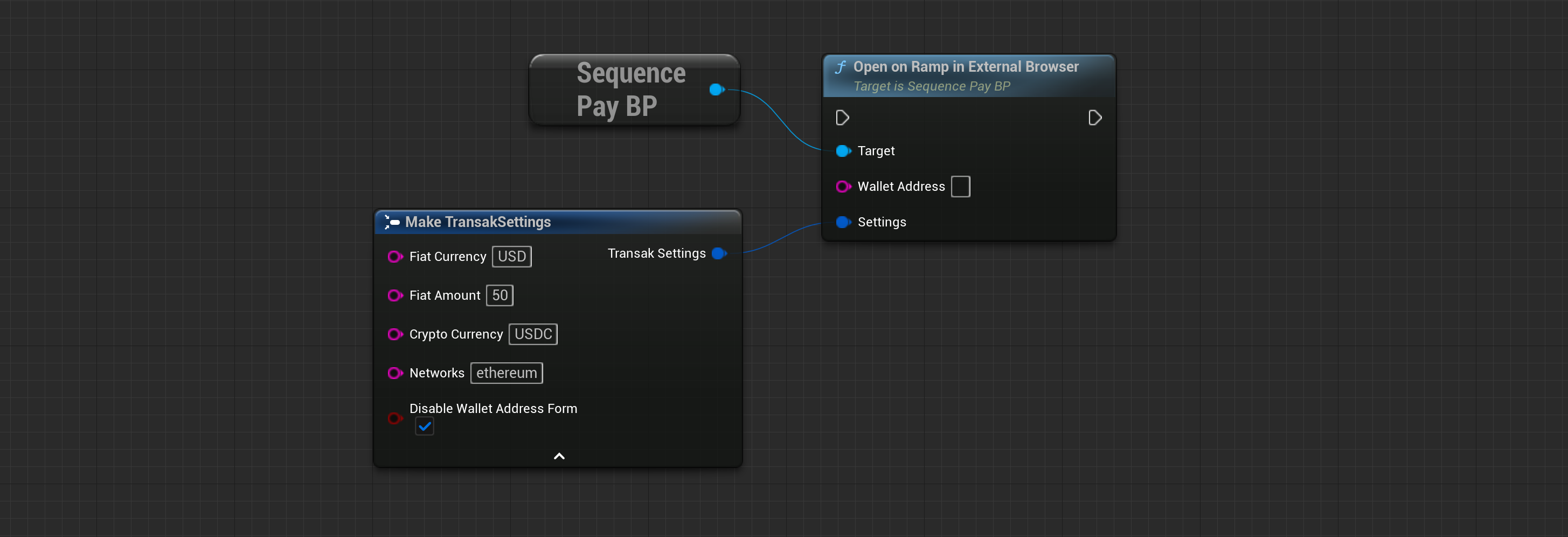
To generate a link for your user's Transak on-ramping:
 ```cpp theme={null}
UTransakOnRamp* Transak = UTransakOnRamp::Init("UserWalletAddress");
Transak->OpenTransakLink("USD", "100", "BTC", "network1,network2", false);
// This will automatically open the generated Transak On-Ramp link in the default web browser.
```
**Wallet Address (FString)**
The address of the user who receives the purchased amount of cryptocurrency.
**Fiat Currency (FString)**
The default fiat currency displayed in the On-Ramp modal.
**Fiat Amount (FString)**
The default fiat amount displayed in the On-Ramp modal.
**Crypto Currency (FString)**
The cryptocurrency the user is allowed to purchase.
**Networks (FString)**
List of networks the user can select, separated by a comma. For example: 'ethereum, mainnet'.
**Disable Wallet Address Form (Boolean)**
Set this value to 'false' to allow users to edit their wallet address.
## Get Supported Countries
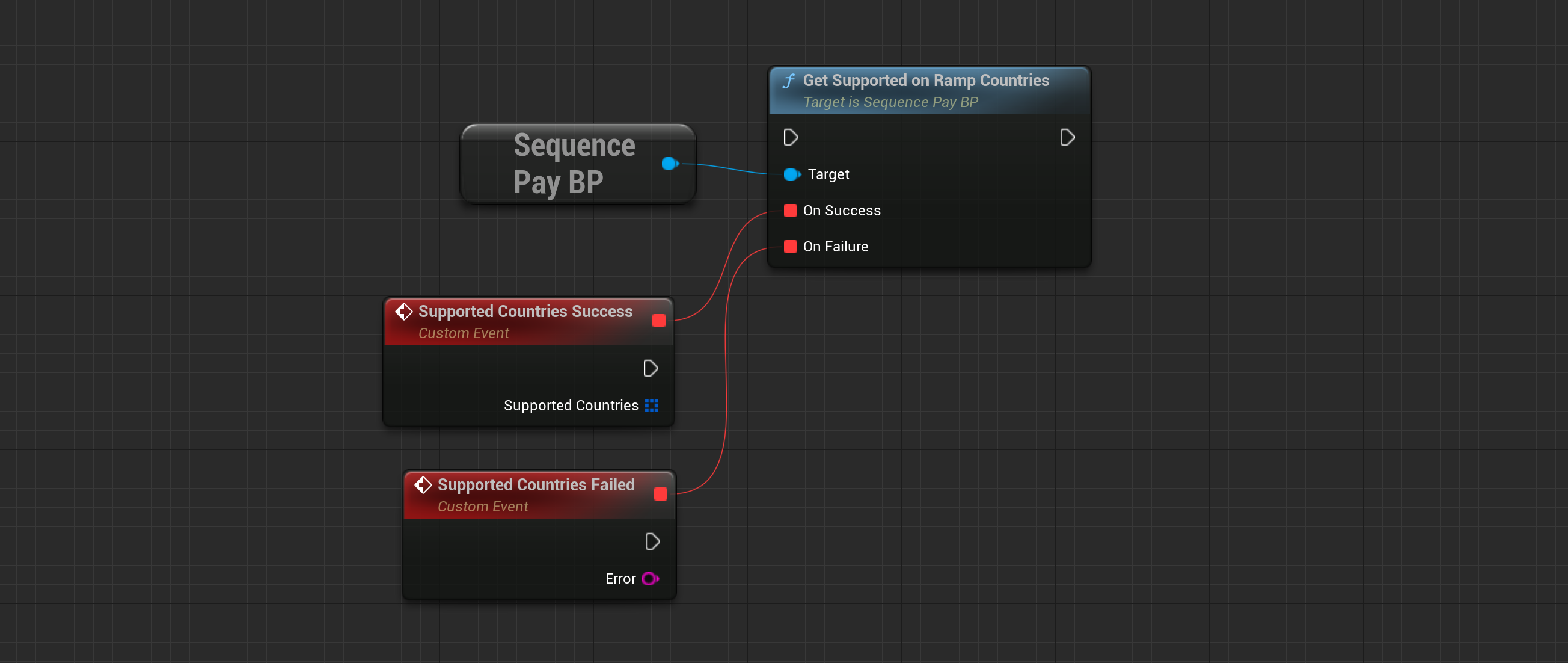
To check the countries supported by Transak and learn about how they are supported, use the `GetSupportedCountries` method.
```cpp theme={null}
UTransakOnRamp* Transak = UTransakOnRamp::Init("UserWalletAddress");
Transak->OpenTransakLink("USD", "100", "BTC", "network1,network2", false);
// This will automatically open the generated Transak On-Ramp link in the default web browser.
```
**Wallet Address (FString)**
The address of the user who receives the purchased amount of cryptocurrency.
**Fiat Currency (FString)**
The default fiat currency displayed in the On-Ramp modal.
**Fiat Amount (FString)**
The default fiat amount displayed in the On-Ramp modal.
**Crypto Currency (FString)**
The cryptocurrency the user is allowed to purchase.
**Networks (FString)**
List of networks the user can select, separated by a comma. For example: 'ethereum, mainnet'.
**Disable Wallet Address Form (Boolean)**
Set this value to 'false' to allow users to edit their wallet address.
## Get Supported Countries
To check the countries supported by Transak and learn about how they are supported, use the `GetSupportedCountries` method.
 ```cpp theme={null}
Transak->GetSupportedCountries(
[](TArray SupportedCountries) {
for (const FSupportedCountry& Country : SupportedCountries) {
UE_LOG(LogTemp, Log, TEXT("Country: %s"), *Country.CountryName);
}
},
[](FSequenceError Error) {
UE_LOG(LogTemp, Error, TEXT("Encountered error fetching supported countries from Transak: %s"), *Error.ErrorMessage);
}
);
```
**Supported Countries (Array of FSupportedCountry)**
List of objects that include information for each country, such as the name or currency code.
```cpp theme={null}
Transak->GetSupportedCountries(
[](TArray SupportedCountries) {
for (const FSupportedCountry& Country : SupportedCountries) {
UE_LOG(LogTemp, Log, TEXT("Country: %s"), *Country.CountryName);
}
},
[](FSequenceError Error) {
UE_LOG(LogTemp, Error, TEXT("Encountered error fetching supported countries from Transak: %s"), *Error.ErrorMessage);
}
);
```
**Supported Countries (Array of FSupportedCountry)**
List of objects that include information for each country, such as the name or currency code.